Preview Live Text — copy one passage
Use the app already on your Mac when you only need to select and copy visible words. It is the quickest route, but it does not give you a repeatable batch workflow for saving searchable PDF copies.
Use Live Text when you only need to copy words. Add a text layer when the PDF itself must remain searchable.
A scan stores each page as an image. OCR recognizes the letters and can place invisible text in a new PDF without replacing the visible page.
Both OCR methods below run on your Mac.
First check
Open the file in Preview, press Command-F, and search for a distinctive word you can see on the page. Then try dragging across a sentence with the Text Selection tool.
Apple documents that Preview Live Text can copy text from an image. That solves copying a passage; it is not the same task as writing searchable text into the PDF file.
Free and local
If you are comfortable with Terminal and already have Node.js, the open-source mac-ocr tool can create the searchable copy without an account or upload:
npx mac-ocr searchable-pdf "scan.pdf"
By default, that writes scan.ocr.pdf beside the original. Open the new file in Preview, press Command-F, and search for a word from the scan. The project's documentation says recognition uses Apple Vision locally and that pages which already contain text are skipped by default.
Keep and check the original. OCR is an interpretation of pixels, not a guarantee. Compare names, totals, reference numbers, and dates with the scan.
Choose the smallest tool
Use the app already on your Mac when you only need to select and copy visible words. It is the quickest route, but it does not give you a repeatable batch workflow for saving searchable PDF copies.
Use the free command when you want a local searchable copy and are comfortable with Node.js and Terminal. It supports PDFs and images, multiple inputs, language choices, and an explicit output path.
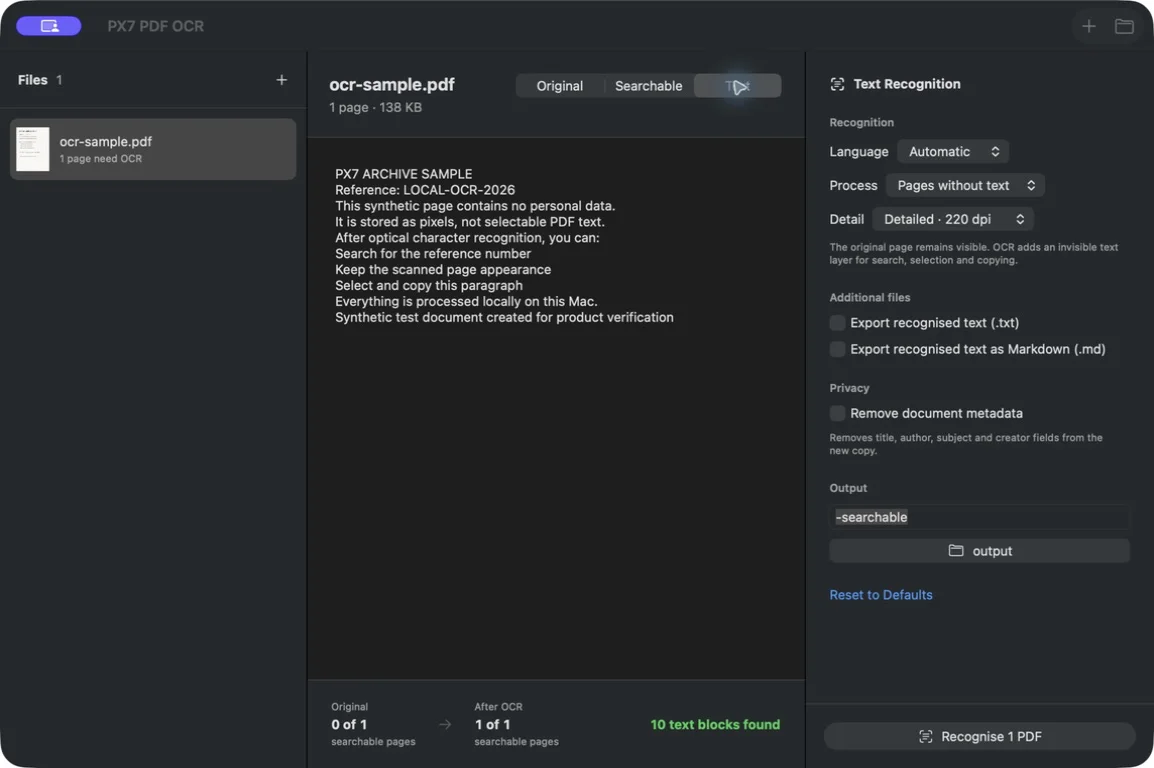
Use PX7 when you want to review original, searchable, and extracted-text views; process folders; choose recognition detail and language; or export TXT and Markdown beside the PDF. It creates new files and never overwrites the originals. €19 once after a seven-day trial.
brew install --cask px7digital/tap/px7-pdf-ocr
Acrobat's Scan & OCR tool creates a searchable text layer and supports multiple files. If your workplace already provides it, use that workflow. Adobe also recommends reviewing the recognized document after OCR.
Verification
Common questions
Preview Live Text can let you select and copy visible text, but that is different from saving a portable searchable text layer inside the PDF.
Yes. The open-source mac-ocr command can use Apple Vision locally and write a new PDF with an invisible searchable text layer.
A searchable-image OCR workflow keeps the scanned page visible and positions an invisible text layer over or behind it. Always compare the output with the original.
No. Scan quality, language, layout, type size, handwriting, and page rotation affect recognition. Review important names, numbers, and dates before relying on the result.