Mark any area
Drag directly across a page to cover text, signatures, images or any other sensitive region.

Redact PDFs permanently on your Mac.
Mark sensitive text, images or any area. Redact creates a new PDF, removes the content behind every mark and checks the finished document before reporting success.
No card required · Apple notarized · €19 one-time · updates through version 1.x · one key for up to seven Macs.
How to redact a PDF on Mac, including the free Preview method
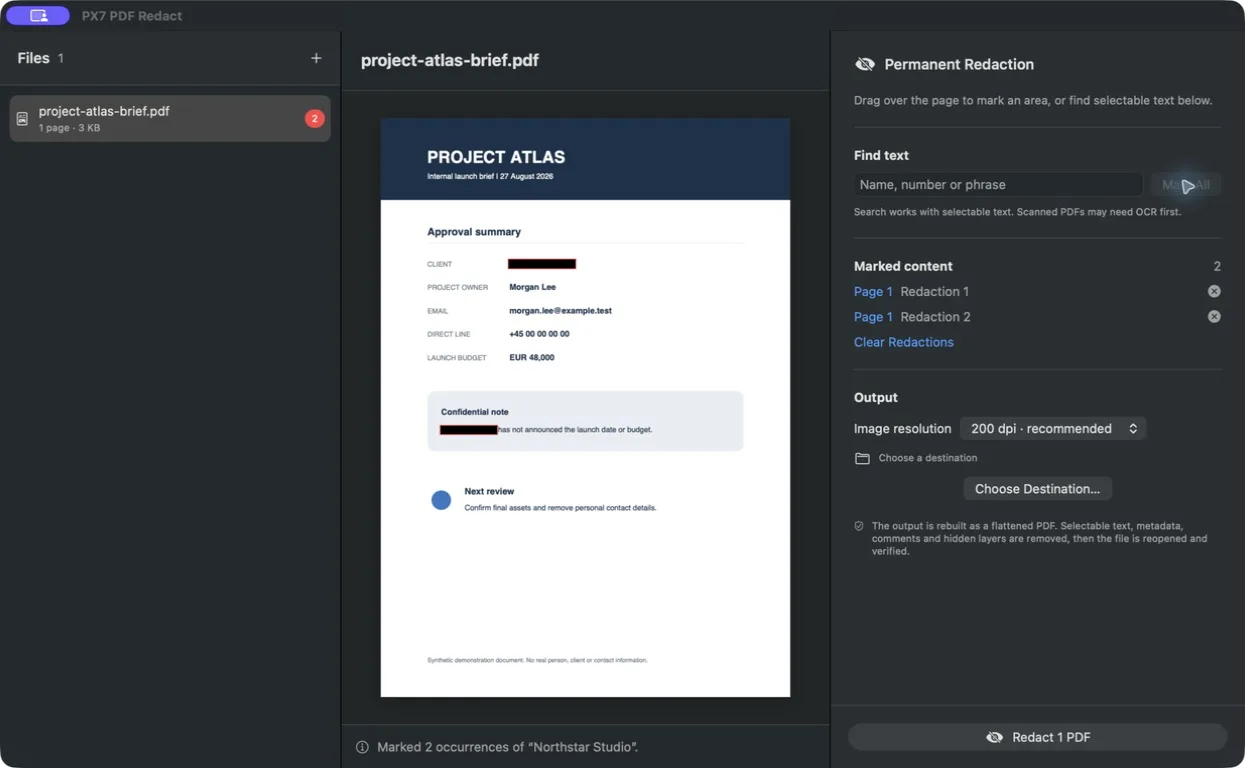
Drag directly across a page to cover text, signatures, images or any other sensitive region.
Search selectable PDF text and mark every match at once. Scanned pages can always be marked manually.
Every output page is rebuilt. Selectable text, comments, metadata and hidden layers are removed rather than merely covered.
The finished PDF is reopened and checked. If the result cannot be verified, the app reports a failure instead of leaving an uncertain document behind.
Add several PDFs, review their pages and save collision-safe copies to the folder you choose.
Source files are never modified. A cancelled or failed operation cleans up its incomplete output.
Review before sharing. Redaction can carry legal or organisational requirements. Always inspect the finished PDF and follow the rules that apply to your documents.
Use the PX7 tap to install the same signed, notarized Universal release from Terminal.
brew install --cask px7digital/tap/px7-pdf-redactThe dedicated distribution and support repository documents the checksum-pinned release and provides a public issue tracker.
Quick answers